|
originalsidebar2
|
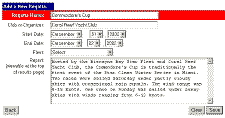
The first step in
the process involves creating a new event. You will be
prompted for the name of the event, as well as information about the
event date, the Yacht Club or Organizer, the race officials and the
Region. The Region is selected from a drop down menu, and will
be used in the future for compilation of regional and inter-club
scoring. If you do not clearly fit into a specific region,
please select "Not Applicable"
|
- click to view full size -
|
This screen also provides an area to enter a
report about the regatta. This field can contain any information you
wish to share about the event. Your report will be visible in the
upper right hand section of the page generated by RegattaBase.
Once you have completed this page, clicking
"Save" adds the new event to your list of events, and a
page will display to confirm the creation of your new event. Follow
the "Continue" to perform the next step:
Adding
Boats
If you have scored the event
with JavaScore, there is no need to add classes. The database will
interpret all of the information in your .regatta~ file, and you can
proceed to:
Upload
the JavaScore File
|


